
Where do our systems communicate to?
See in the captured traffic which internal systems contact external destinations — including connections to destinations known to be malicious.
AEGYS Pulse · Network analysis
An internal system contacts an unusual destination. New communication appears between network segments. A data flow deviates from its usual behaviour. AEGYS Pulse surfaces such anomalies in captured network traffic and gives your team starting points for investigation.
Guided trial in your own network. We clarify prerequisites and scope together.
Passive capture · No agents on endpoints · Analysis in Germany
QUESTIONS
See in the captured traffic which internal systems contact external destinations — including connections to destinations known to be malicious.
Look into new connections, unusual data volumes and deviations from previous communication behaviour.
Follow up on notable communication between internal systems, as far as it is captured at the chosen measuring point.
A notable pattern is a reason to investigate. The assessment happens in the context of your environment.
SAMPLE ANALYSIS
The analysis groups recorded alerts by type and frequency. This helps your IT team put anomalies into context and investigate them in a targeted way.
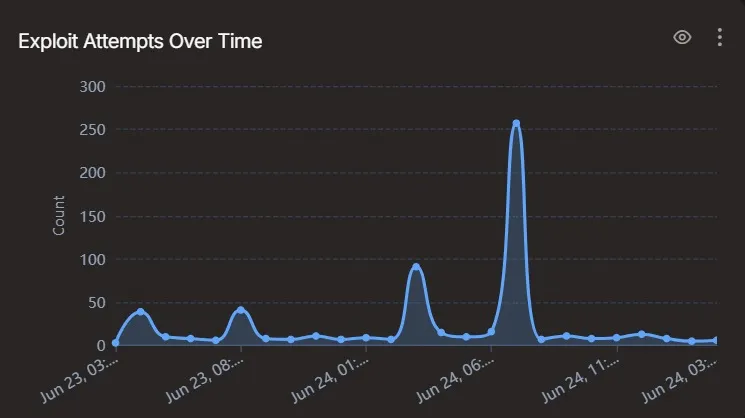
Observation: The view shows documented exploit attempts over time. Attempts are not proven successful attacks.
Context: For the assessment, the systems involved, the affected connections and the timing within the operating picture of your environment are relevant.
Investigation: This leads to a concrete next step: trace the affected systems and connections specifically and match them against known activity in your environment.
INTEGRATION AND OPERATION
Pulse captures a copy of the network traffic via a SPAN/mirror port or a network TAP. Your existing protection stays in place. Which areas become visible depends on the measuring points and the network structure.
Together with your IT team we clarify which network segments and communication paths should be covered. With multiple sites or segmented networks, placement is agreed accordingly.
Your IT team provides the suitable mirror port or TAP. The connection to the analysis platform and the operational prerequisites are clarified before connecting.
Before deployment we define who reviews the findings, how results are discussed and who takes on further investigation or measures: your team, your service provider or an agreed security partner.
Continuous capture describes the technical observation. Scope of support, analysis cadence and response paths are agreed separately.
“Runs in the background, we don't notice it — and that was exactly the point. We wanted visibility without having to look after it ourselves.”
DATA PROCESSING
The statement that no content is captured refers to standard operation with connection metadata. Extended modes such as deep packet inspection or PCAP recordings are used only by explicit agreement.
Architecture and data processingDETECTION
Signature matching
Checks captured network data against known attack patterns.
Behavioural analytics
Identifies deviations from usual communication behaviour.
Threat intelligence
Matches observed connections against known threat indicators.
GETTING STARTED
In the guided 21-day trial you see which findings Pulse delivers within the agreed capture scope. You then decide on further deployment.
FREQUENT QUESTIONS
NEXT STEP
Talk to us about your environment and your reason for looking. Together we clarify a sensible capture scope and the right way to start.
Background: positioning NDR, SIEM and SOC correctly